Showing posts with label Apps. Show all posts

Thursday, January 22, 2015

And finally the wait is over Whatsapp Web is here ; Now use Whatsapp directly from your computer's browser

  • What is Whatsapp Web ?
Whatsapp  Web is an add-on feature to Whatsapp. It will basically enable you to use your Whatsapp on your computer's browser. Yes you can send and receive  your Whatsapp messages using your PC.All you have to do is scan a QR Code and you are all set to use it.Your phone is out of charge? Or you just don't want to check your phone after every couple of seconds to look for new notifications while you are working on your computer...Or Be it anything. 


  • How to use Whatsapp Web?

To use Whatsapp Web you just need a latest update of whatsapp. Once you have it follow the steps-
1. Open web.whatsapp.com


2. Notice the QR Code. And Scan it from your phone.
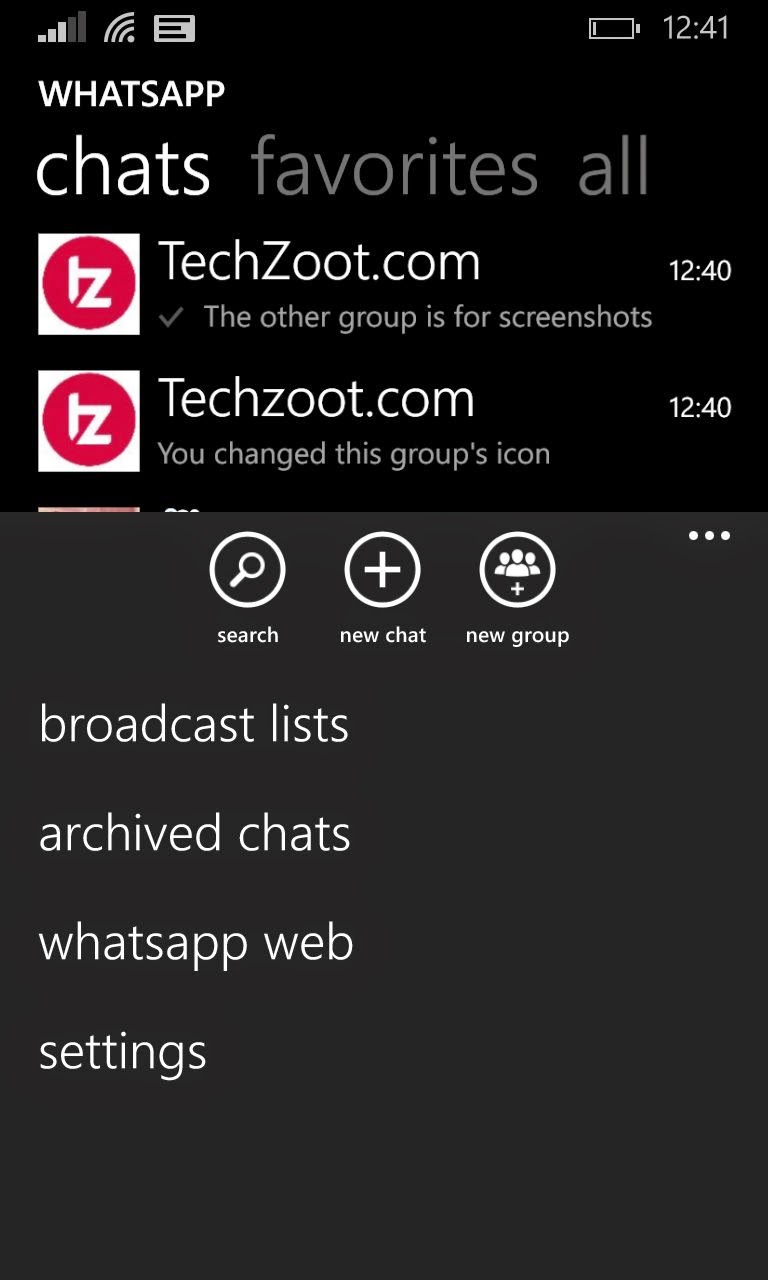

3. How to scan? You don't need a standalone QR code scanner. As Whatsapp has its own encrypted scanner. Once you have opened Whatsapp. Go to Menu and then Whatsapp Web.         
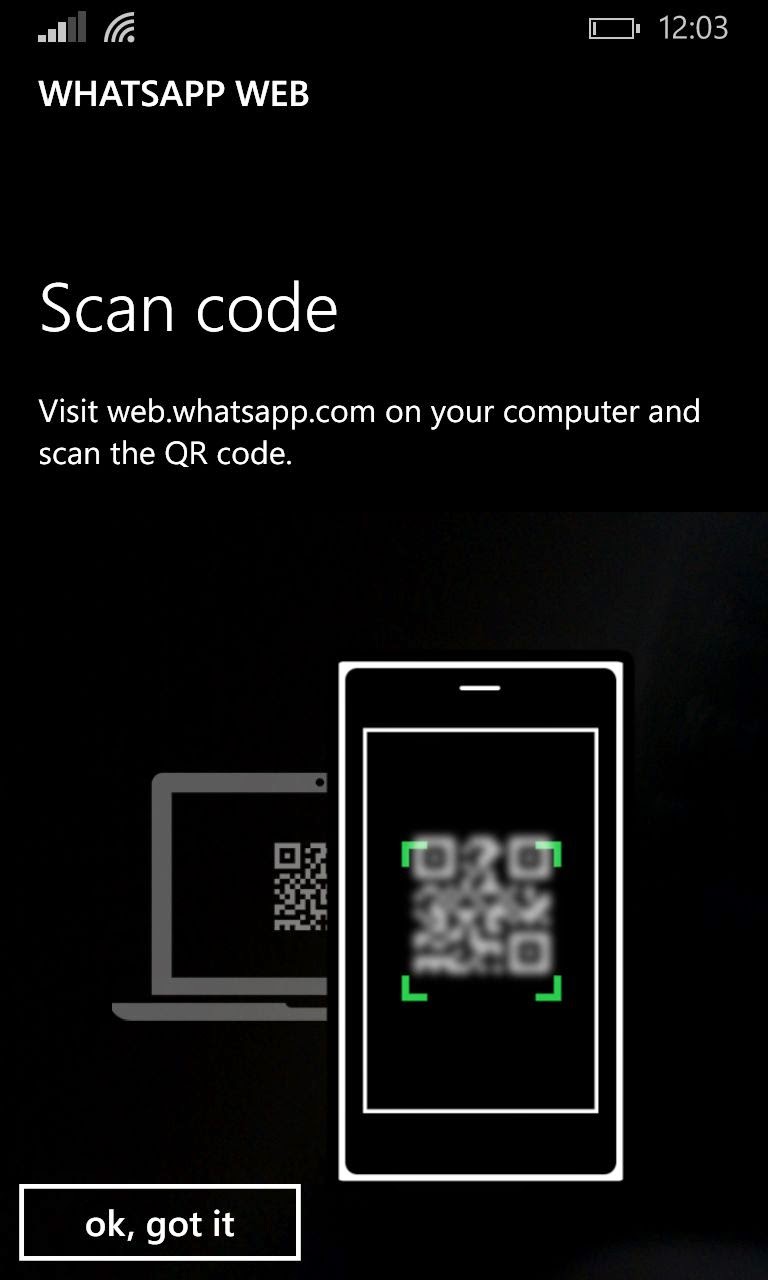
 You will notice a new scree like this one-

4. Now point your phone's camera to the QR code and within seconds you are connected.

5. Now what? It will notify you to Enable Whatsapp Web notifications as it will trigger you when you receive a message.

6. Now you are good to go.

7. This is how Whatsapp Web will be like while running on your PC.


  • Okay Got it. Any Particular Requirements?And How does Whatsapp Work?

All you need is the internet connection both on your phone and computer. As Whatsapp Web will synchronize messages from your phone only. As soon as you will receive a message on your phone. It will notify you here.

There are no other requirements. It will work on any OS. Android, Windows Phones, iOS, Blackberry even Symbian S60. So just update the app and you are good to go.

Whatsapp Web is indeed an important add on which I of all people need as I loathe using my phone or checking it for new messages after every couple of minutes. Whatsapp Web will not only make your work easy but it will also save your phone's battery as you no longer to check for notifications.

  • Is Whatsapp Web secure?

I have used it for a while. And yes its secure. Basically it is just a layer that is working on your PC on a frontend basically it is synchronizing messages from your phone. Moreover Whatsapp will use its encrypted QR Code system which cannot be manipulated with.Moreover it will show you the last location from where you had connected your device and which device was it along with a logout option.So it is no doubt secure.

But yes as they say in incognito mode. The person right behing you can peep into all your messages =D. Well that's entirely on you.

  • Will this feature work with Whatsapp Plus?

No. Apparently Whatsapp Web comes comes after the day when Whatsapp banned all the users who were using Whatsapp Plus and Whatsapp Plus will no longer be working.


Anyway that's all. Comment Below if you have any other questions.

Happy Whatsapping!


Saturday, October 25, 2014

PhotoMath App Makes Solving Maths Equations as Simple as Taking a Picture

Do you have math homework? Are you in a hurry to finish that assignment of 50 problems? Worry no more, check out this app – PhotoMath. Basically, it simply uses your phone’s camera to look at your math problem and before you know it. BOOM !. Problem solved. It’s a really cool idea – isn't it. However, it shows the potential of smart phone with math homework. Soon, there will be some app (or this one) that can figure out all your homework. Not just math. I, for one, welcome that day. And I am not that good with math anyway so its a win win for me anyday. It makes solving math equations as easy as taking a picture.


Now coming to PhotoMath its a free mobile app that can read and solve mathematical expressions using your smartphone camera in real time. PhotoMath might sound like it help kids cheat, but the app also provides all the steps showing how each of the problems is solved. This step-by-step guide is beneficial to students that do not have access to a tutor and struggle with solving math problems. Parents can also use the PhotoMath app to jog their memory when teaching math to their kids. 


“PhotoMath currently supports all basic fractions,arithmetics and decimal numbers, linear equations in fact even several functions like logarithms. The PhotoMath app uses optical character recognition (OCR) technology to read the equation and calculates the answers within seconds. There is a red frame in the PhotoMath app that can be adjusted which you have to use for capturing the equation. PhotoMath’s ability to read math problems has some limitations though one of them is that PhotoMath can only read printed text so your handwritten notes cannot be solved by this app. 


When I tested out PhotoMath on an order of operations equation, the app kept on mistaking the “X” variable as the multiplication symbol. The red frame also causes limitations because there may not be enough spacing between two separate math problems in the textbook to capture the equation that you want but you can try to reframe the red rectangle. 
Microblink, the London-based app development company behind PhotoMath, is also planning to use the same technology for online banking in the future. Aside from the PhotoMath app, Microblink also works with a number of customers across 30 countries to set up “computer vision technology” for their mobile apps. For example, Microblink integrated its PhotoPay technology to eliminate manual data entry for bill payments with several major European Union banks. Another app that Microblink developed — which is called PDF417 Barcode Scanner — lets users scan 1D barcodes, 2D barcodes and QR codes. The PhotoMath app is available for free on iOS and Windows Phone now , but the Android version will be released next year. 

Get photomath

Smart camera calculator
Source- Forbes.com

Sunday, September 28, 2014

How to recall/unsend a text/SMS in your android smartphone easily ?

Did you just send an awful,idiotic text to your boss? Did you get really drunk and texted your ex really 
late at night?


If you did and wondering how to undo your SMS/text, in other words you need to unsend an SMS as quickly as possible. It’s not that easy to do that on any mobile device, but if you are an Android user then luck is in your side, one new app aims to make unsending an SMS as easy as possible.Yes, no need to plan about stealing the phone.
That app you ask is TigerText Secure Messenger, which can be used as a replacement for SMS/MMS messenger on any Android device. Above all,unlike other devices even if your recipient is not using this app this function will still work.
Here are the steps on How to make use of the unsend functionality in Android devices?

Step 1) Install TigerText app from here and set this this app as default.
Step 2) Type out your text messages using the this app
Step 3) Send the message, then tap and hold it
Step 4) Tap Recall to delete the text message from the recipient’s device.
NOTE--This function will only work if the recipient has not yet opened the message.
Step 5) To make sure that the Recall(*Unsend) function worked, check the green icon next to your message. This icon indicates that a message was successfully sent. If you successfully recalled(^unsend) that message, that green icon will not be there.
Really, recalling a text message doesn't get that much easier . You can switch your default SMS/MMS apps around from the in-app menu of the SMS app of your choice any time.

If you already know any such app do let us know and we will surely write about it in our next post.


Tuesday, August 12, 2014

Group screen sharing on Skype is now free

Yes you heard it right. Screen sharing on Skype on desktops is now free.

For example, you've got a hilarious pictures that you would like to share with your whole gang that is connected with your desktop (simply who is on your Skype contact list) or if you are on Skype call with your colleagues and want to explain a concept or show something like an important upcoming event and just want to show them what you mean instead of explaining everything. With Skype group screen sharing now 
you can.


Earlier it was like you have to apply for a subscription to Skype Premium to share screens with two or more people. Now not any more, no subscription required, no charges. It's absolutely FREE.

According to Skype blogs many users have already informed how useful screen sharing is. For many things like the tech support for family or clients or language tutoring or even gaming.
We know this is a great feature to have, so it's great that Microsoft have introduced this and have offered a free screen sharing for groups.

Try it today and let us know what you think of this in the comments below.

Just get the latest version of Skype for Windows or for Mac OS.


Source : Skype blogs

Saturday, March 29, 2014

How to download free music on your android device??

It's such a hassle to transfer songs to your Smartphone from your PC or Laptop every time you download a new one. But what could be more amazing for music lovers to download the music right to their smartphones without having to transfer your favourite songs from your PC or Laptop. There are a number of apps available on the Google Play Store that lets you download mp3 songs for free on your Android device. But here we have picked some of the best ones for you-

Musicmaniac


This app is for all the music maniacs. Music Maniac app has been rated highly and is available for free on Google play store. This app lets you search and download millions of free mp3 songs from public search engine. It gives you various options for searching music.
You can search for songs by title or artist, or album, but you can also search for top songs by an artist, making it easier to just find a certain hit.

GTunes MP3 Music Downloader


This app is very simple and easy to use. Type in the search box what you are looking for and you will be good to go. Just like the other mp3 downloader apps, Download free music app allows you to play the song before you download it and you can pause or resume the download too.


MP3 Music Search Download


Mp3 Music Search Download Pro is a nice app for downloading free music from search engine and public domains.
What's great about this app is that you can actually edit songs, and set them as ringtone. Like other apps above the app also allows you to pause or resume the download as well as share the download link.

MP3 Music Download


MP3 Music Download is also a great app for downloading free music to your Android.
This app lets you download music from public domains via public search engines. Like the most other apss mentioned above it also has a search app making the things easier for you.


Saturday, March 15, 2014

How to record phone calls on your Android Device?

Step 1) Download and install a Automatic Call Recorder ( <-CLICK HERE)
Step 2) Once Installed pen that app and head to the settings menu.
Step 3) In settings menu check the box option to Record Calls and then go to Media settings menu. Change the recorded call file type to .WAV format as it produces the high-quality cell phone recordings and you can change it anytime Good quality means large file. Atlast, change your default Audio Source to Mic  (most phones have this by default).
Step 4) Test if the app is working by calling someone. You will find a red recording dot under your phone’s notification . Once your phone call ends, you will receive a notification about a New recording. You can tap that notification and do all sorts of file-related functions, including Play, Delete, Share, Save, and Call Contact.
Automatic Call Recorder is not just the only Android app available for recording phone calls, but it is good. As the recording capabilities are automatic and you’ll never forget to record an important phone call. It also gives you the option to save phone calls on the cloud to free up some device space.

Alternative Method if you use Google Voice users.

If you are a Google Voice user, there is even easier way to record your phone calls. Google Voice only works through Gmail, but if you are calling a contact on your Android phone, then you simply have to press 4 (key on your keypad) while the call is active in order to record the incoming cal

NOTE-

Don’t forget: recording someone’s phone calls without their knowledge is a criminal offence. Going by the United States, federal law requires the parties to know if they are being recorded. That’s why some call centers always say , “This phone call may be used for training purposes.”
As our traffic comes from India, so India’s recording laws: it is illegal to record a telephone call without approval by “a designated authority”, which means that you will need permission from the government.

Thursday, March 13, 2014

How to get Samsung Galaxy S5 features on any Android device ??


DO YOU FANCY THE NEW FEATURES ON THE NEW SAMSUNG GALAXY S5? HEART RATE MONITOR,PEDOMETER, DOWNLOAD BOOSTER, SELECTIVE FOCUS, ETC.? WELL, HOW ABOUT IF I TELL YOU THAT YOU CAN GET THESE FEATURES ON YOUR CURRENT ANDROID PHONE. WITHOUT SPENDING A SINGLE PENNY...

YEAH, THAT'S RIGHT! IT’S THE ERA OF SMARTPHONES, AND YOU KNOW WHAT THEY SAY — “THERE IS AN APP FOR EVERYTHING“.

You can get most of the Galaxy S5 features on your Android device . However, features that are fully dependent on the hardware components may not substitute in the form of an app, like the fingerprint scanner on Galaxy S5, it cannot be substituted by just an app. But the heart rate monitoring has a completely different story. Apps like these could utilize the your phone’s camera to get heart rate, we’ll discuss on this in detail later.
Hmm...So before I start let’s take a look at some of the new features of Samsung Galaxy S5. Thankfully, Samsung has released an ad video detailing upon all the new features of its flagship device Galaxy S5.

Here's the video:-


Let’s see now what alternatives we can use in order to get these Galaxy S5 Features on almost any Android device out there. We’ll go sequentially with explanation of each feature and apps that can be used as an alternative for these features.


HEART RATE MONITOR

There’s dedicated hardware support on Samsung Galaxy S5 which lets users monitor their heart rate/pulse instantly on the phone. It works just by placing the tip of index finger on the heart rate checker (located on the back of your device, just below camera) for a few seconds and your heart rate bpm starts showing up on screen.The button is quite similar to what we saw in LG's G flex.
It’s exciting, but there is nothing new. Heart rate monitoring apps are available on Android since 2009 (5 years). Let’s have a look:

ALTERNATIVES: 2

The two apps provided below can check your heart rate without a dedicated heart rate sensor on the phone.
HOW? Heart rate can be monitored just by placing the tip of your index finger on your phone’s camera. The key part is that your index finger should be near some light source — if your phone has flash near the camera then it’ll surely work for lightning up your index finger, otherwise after placing your index finger on camera move your finger near some light source (a torch or a lamp) and you’ll be good.


  • INSTANT HEART RATE
Instant Heart Rate is one of the oldest heart rate monitoring app available for Android. This app works great and gives you highly accurate heart rate measurement with graphs/charts to make it easily understandable. It also alerts you if your heart rate is good, average or bad.

Runtastic Heart Rate
  • RUNTASTIC HEART RATE
Runtastic Heart Rate is a relatively newer app for monitoring your heart rate but it’s somewhat advanced than its older brother Instant Heart Rate app. Runtastic has intractive UI and allows you to compare or share your heart rate with friends and family on various social networks Facebook, Google+ and Twitter.

____________________________________________________________


DOWNLOAD BOOSTER

Samsung has introduced  an amazing new feature on Galaxy S5 that combines all the available internet connections on your device and then lets you use  the combined data speed to boost download speed of your device. The WiFi and LTE/2G/3G/4G connections are combined and then their commutative data speed is used to boost your download speeds.
Interesting isn't it you can get super high speeds plus it will optimise your usage so that you don't end up using one.

ALTERNATIVE  

Super Download Fast

  • SUPER DOWNLOAD – Fast

The Super Download – Fast app  will do the same magic of combining data speeds of all your available internet connections available on your device and then use it to give a boost to your current downloads. However, as you know this is kind of tricky stuff, the app requires root access to be able to combine these download speeds from WiFi and 2G/3G/LTE/4G.
On a good point, the app is also works as a download manager with support for increased concurrent threads to further boost your download speeds.
   DOWNLOAD SUPER DOWNLOAD LITE – Fast (FREE)   |   PAID VERSION


____________________________________________________________


PEDOMETER

Another fitness bonus that Galaxy S5 comes is an built Pedometer which intelligently counts all the steps that you have taken all throughout your day and then uses that data to show you how much health benefits you’ve gained just by walking. The Ghardware component to get the job done and 

unfortunately only three other phones on the market currently have dedicated hardware for counting steps — Nexus 5, LG G2 and Galaxy S4 Google Play Edition.

Anyway, the good news is that even if your device don't have the dedicated hardware component you can still manage to count your steps. While a hardware component might  help in saving some juice of your battery but then its no big deal. The job can also be done using other available sensors on your Android device — Accelerometer and Gyroscope.


Check out these cool apps given below to see it in action yourself:

ALTERNATIVES: 2

Noom Walk

NOOM WALK: PEDOMETER
Noom Walk has smoother interface, advanced features, with some social sharing options, Infact you can match up over the number of steps you take with your friends interesting isnt it. And most importantly the developers boasts that Noom Walk utilises even less than 2% battery during a day of use.
Runtastic Pedometer


  • RUNTASTIC PEDOMETER

Runtastic Pedometer is another amazing app to count the number of steps you walk throughout the day while using your phone. And while it’s almost similar to Noom Walk  feature wise, It has just one additional feature that it can tell you How fast you are walking.? That's Cool, right?


Galaxy S5 Selective Focus

SELECTIVE FOCUS

Galaxy S5 lets you create a blurred out background or foreground on your photos even after you have clicked them. It makes the photos look beautiful and gives your photos more detail now this is something for which DSLR camera’s are popular for.
I have seen some great apps on Play Store that lets you do the same thing, but then I have to admit that on Galaxy S5 it’s painlessly simple to do that, as compared to the alternative apps that I have shared below:

ALTERNATIVES: 2

After Focus

AFTER FOCUS
AfterFocus is the most robust and slicker app available on Play Store to defocus and blur out the background or foreground on your photos. However, unlike Galaxy S5 it doesn’t automatically blurs the background at one-touch, you have to select the area which you really want to bring in focus and the app will then blur out everything else on that photo.
Easy Focus


EASY FOCUS

Easy Focus is just another great app to perform SLR camera like blurring on background objects in your photos. The app’s interface is simple and like AfterFocus, you just have to select the area which you want to keep focused in a photo. You should give this app a try too along with AfterFocus.


 Galaxy S5 S Health

S HEALTH [Samsung's fitness app]

The S Health app on Galaxy S5 comes pre installed on other Samsung Galaxy devices as well. It helps you to keep a track of your fitness and sports activities.
There are plenty of such apps available on Play Store for tracking your fitness level and chances are that you might have already tried some of them. In case you haven’t, follow the links below:
  Runtastic: Runtastic has we already pointed out is the widest range of fitness apps available on Play Store.So do check out their apps.
  Endomondo: Endomondo is another great app to keep track of your fitness and sports activities.

_________________________________________________________________________________


Galaxy S5 Power Saving

POWER SAVING

"Samsung GALAXY S5 can last for 13 hours at battery level as low as 35% only"
Samsung has loaded in the best power saving features on Galaxy S5 ever possible,It could last for almost 13 hours at battery level as low as 35% Imagine!! no more need to keep those square portable bricks with you. There’s this ‘ULTRA Power Saving” mode on the Galaxy S5 that once you turn on your device display to Grayscale display it will block every background process on the phone keeping only the Call and SMS function active. We could easily imagine how much battery that can possibly save on a phone.
We did not find any app on the Play Store that could bring in such wonders, since it requires deep integration to system files of your device. And as of now I’m not aware of any custom ROM which can do that much power saving. But hopefully soon enough some developer might take up this idea and integrate it into a customized ROM.
Anyway, we have got some apps below that can still help to save you a good amount of battery power and are quite similar to other power saving modes available on the Galaxy S5:
Greenify


GREENIFY

Greenify lets you freeze background apps from running in background and take extra spin on your ram killing your battery. Once you freeze an app with greenify it’ll no longer be able to drain your battery ever, unless you use it often. If you have root access on your device then in that case you can even freeze system apps, but be very careful with that since it can lead to an unstable system if you freeze an app that’s actively required for the system processes.
Easy Battery Saver

EASY BATTERY SAVER
Easy Battery Saver takes the pain of you toggling between connectivity WiFi/Data/Bluetooth options to save your battery power. Plus, it couple of enhanced automated options for blocking certain apps from using data in the background and consuming both phone’s resources plus network data causing unnecessary battery drain. A must have app for your Android devices.
   DOWNLOAD EASY BATTERY SAVER

____________________________________________________________


Galaxy S5 HDR (Rich Tone)

HDR (Rich Tone)

HDR is short form for High Dynamic Range, this feature lets you capture photos with natural colors under any lightening conditions. With HDR, the camera captures the same image at different levels of exposure and then layers them up to create one fully optimized photo. It helps you to take pictures in high contrast situations, like near to an open window or when the sun is behind your subject.
Samsung names it “Rich tone” on its devices.
If you bought your phone last year then chances are that you already have these feature on your phone. Check in your camera app. If not, you can download this HDR Camera app from the Play Store (link below)
  Download HDR Camera


Comment below if you have any queries regarding this.Or tell us if you have more to it.


Liked this post??
Then feel free to share with your friends..Select the social buttons below.


Join our Gang and get notified about all the great posts we share on the go.
                        

                           FACEBOOK!  TWITTER!   GOOGLE PLUS!